
Welcome Screen
When you open StellarCanvas, starting from version 4.1.3, you will be greeted by a welcome screen. This screen makes it easy for you to get started with StellarCanvas, as it provides a collection of shortcuts for the most common tasks that you will probably be doing when you open StellarCanvas.
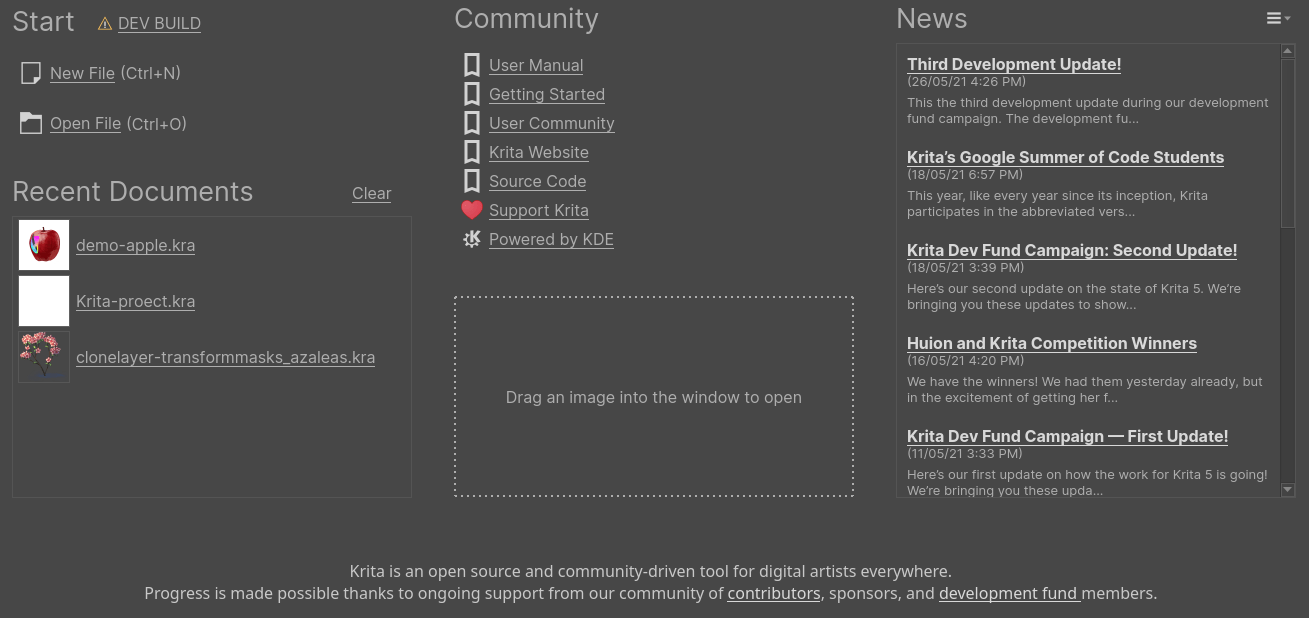
The screen is divided into 4 sections:
The Start section there are links to create new document as well to open an existing document.
The Recent Documents section has a list of recently opened documents from your previous sessions in StellarCanvas.
The Community section provides some links to get help, Supporting development of StellarCanvas, Source code of StellarCanvas and to links to interact with our user community.
The News section, which is disabled by default, when enabled provides you with latest news feeds fetched from StellarCanvas website, this will help you stay up to date with the release news and other events happening in our community.
Other than the above sections the welcome screen also acts as a drop area for opening any document. You just have to drag and drop a StellarCanvas document or any supported image files on the empty area around the sections to open it in StellarCanvas.
On Android, there may also be a button or graphic for supporter benefits at the bottom. Whether this is available depends on which build of StellarCanvas you are using and whether your device has a connection to Google Play.